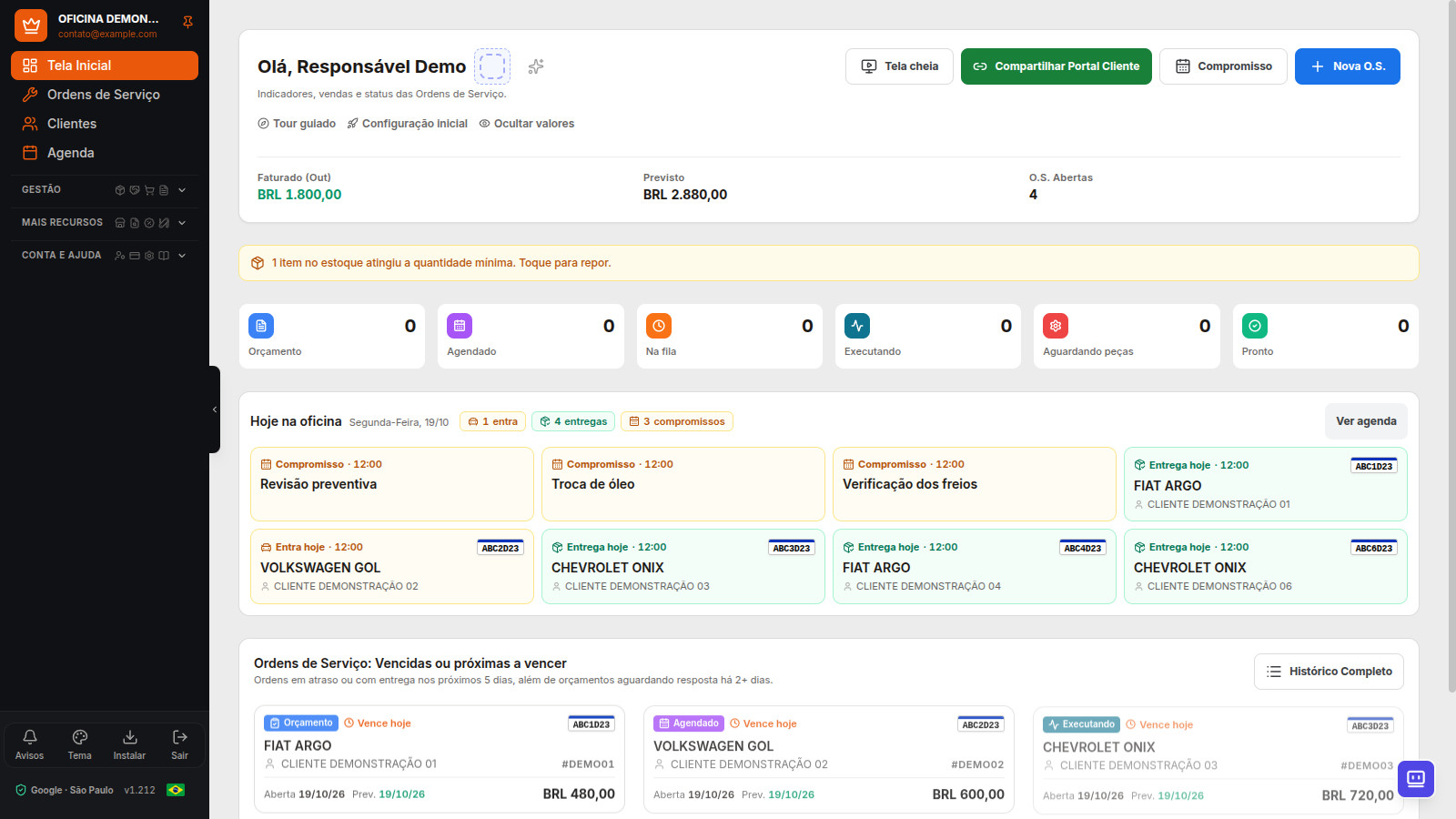
Dono da Oficina is a technology partner for the repair shop: it connects customer service, parts, team, customer, finance, technical information, and tax documents in the supported workflows. The platform brings together management, automation, portals, support, and collaborative product development to keep pace with the business. Features, integrations, and terms vary by plan and enablement.
Workflows for different shop segments
An operational segment describes how the shop works. Vehicle type describes what it serves. A tire shop may serve cars, motorcycles, or heavy vehicles; collision repair and detailing can coexist in the same business. Dono da Oficina supports these combinations with the features available in the plan.
- General and motorcycle repair: work orders, inspections, estimates, approvals, parts, history, payments, and follow-up.
- Auto Center: services and parts in customer service, scheduling, team, commissions, and integrated finance.
- Tire shop: record services and parts on work orders, track items below minimum stock, and organize payment collection.
- Collision repair and paint: photos, estimates, insurer identification, deadlines, and a paint record with color candidates that require confirmation. It does not replace approval by the insurer.
- Automotive detailing: scheduling, service estimates, photos, supplies, Customer Portal, and service tracking.
Learn about the workflow for motorcycle repair shops.
Check each feature and its terms.
Technology that keeps pace with the shop
The partnership shows up in daily work: the same work order connects estimates, authorization, parts, and payment; the portals bring customers and accountants closer; imports reduce retyping; and the manual and tools support the team. Each feature has its own plan, access, and coverage requirements.
Support receives service requests and suggestions. Collaborative product development lets users suggest improvements to the standard product, subject to review, feasibility, and prioritization. It does not represent guaranteed custom development or replace the shop’s technical responsibility.
Finances and team, with context
Track cash, payments, expenses, cash flow, and income statement. Reports use recorded transactions; unrecorded amounts do not automatically become revenue or expenses.
Current plans do not limit the number of users. Configure permissions and add the professionals involved in the operation. Starting with Professional, define commission rules and check period closing against recorded services.
Counter sales, payments, and network
- Ultra and Network: counter sales without opening a Service Order, plus Vehicle Buying and Selling.
- Payments through Mercado Pago Point, InfiniteTap, and InfinitePay links depend on setup, fees, approval, and compatibility.
- Network plan: multiple CNPJs and per-location tracking, subject to configuration.
Technical information and Dona
From the Essential plan onward, the Tools menu brings together manuals, tables, calculators, converters, and useful links. The inter-shop catalog helps repair shops find and list parts, with contact and negotiation between the parties.
On Ultra and Network, Dona responds by text or voice to check Service Orders, the service bay, minimum stock, and calendar, and to guide users. The AI is in Alpha development; review its responses and confirm proposed actions. It does not replace technical diagnosis or accounting advice.
Warranty, search, and resuming work
A follow-up for the same service can be linked to the original Service Order as a warranty case, without being treated as a new sale. Global search finds Service Orders, customers, license plates, parts, and screens, subject to user permissions.
Unsaved changes can be recovered on the device itself, within each screen's limits. Photos, files, and passwords are not included in this copy. Without internet, view what has already been opened; reconnect to save.
On the Home screen, hide amounts during service. This visual choice does not change permissions. Anyone with authorization can also review the account access history.
Follow-up, access, and development
Schedule the next oil change by time and mileage, generate a reminder label, and configure loyalty according to the plan. Connected WhatsApp sends notifications subject to the shop's limits and do-not-disturb hours.
Use the system in a browser or as a PWA. Portuguese, English, Spanish, and Italian are available for the interface and portals in supported workflows; the selected language does not change historical currency or tax authorization.
Support accepts tickets with attachments. Enhancement suggestions go through approval and prioritization; the referral program follows its plan, waiting-period, and credit terms.
Collaborative development terms.
Notifications and achievements are separate features
System notifications track operational events. Push notifications depend on browser permission; automatic emails support access, security, billing, and tax documents. There is no unrestricted email sending or email campaign feature.
The Achievements area shows experience, levels, and milestones from recorded activities. It differs from customer loyalty and the referral program: each feature has its own purpose and conditions.
Understand the complete work order and estimate flow.
Learn about manuals, calculators, and the paint sheet.
Frequently Asked Questions
Does the free trial include all paid features?
No. The new account includes 15 days and up to 30 Service Orders, with no card required. Photos, portals, tax features, WhatsApp, and other features are subject to plan terms.
How can I check everything the system offers?
See the feature catalog and plans page. Before subscribing, check the features, limits, and requirements for your operation in the app.