Converters, torque tables, manuals, paint sheet and useful links - what the mechanic would look for on the phone, inside the app.
Where to find it in the app
Tools area.
Step by step
- On mobile, registrations start with the sheet's fields, without a title bar. Tap the field to type and use the footer actions to finish or exit.
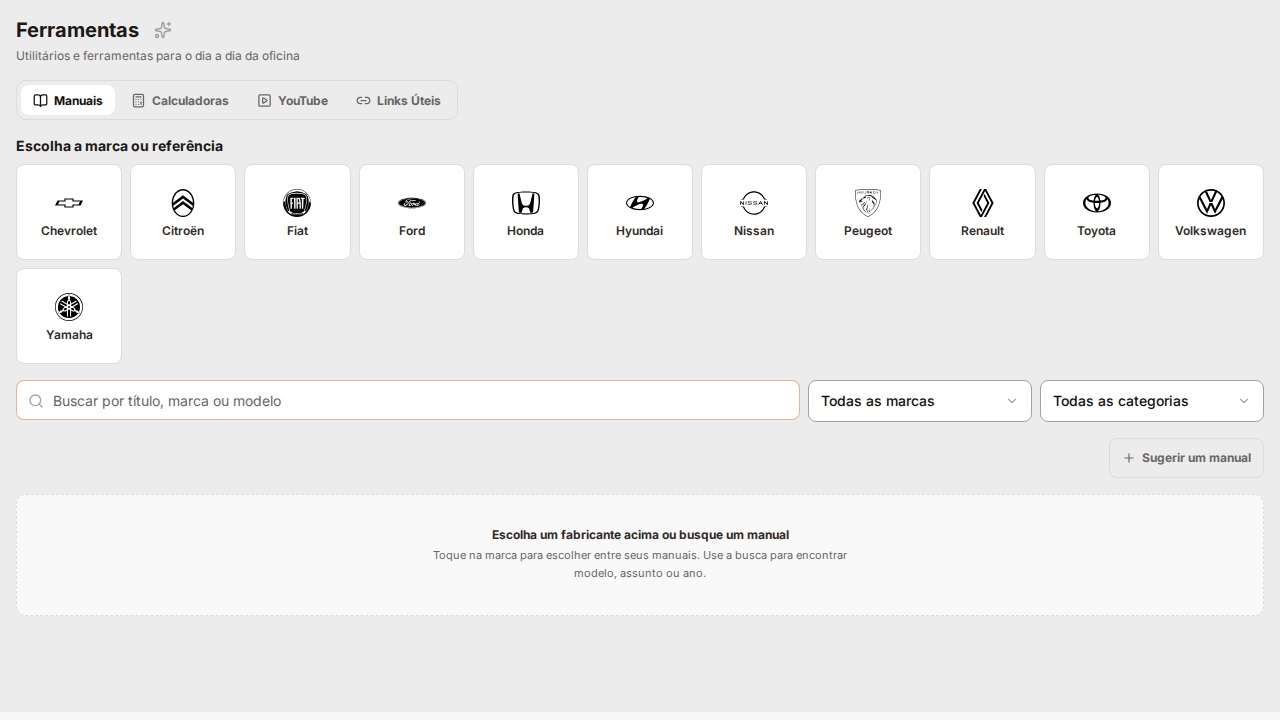
- Tools opens in Manuals. Paint Sheet is on the second tab; Calculators, YouTube and Useful Links come after.
- In the Paint Sheet, the cards stay aligned on wide screens. When space runs short, Factory paint sits below Vehicle to keep the fields intact.
- In Paint Record, enter the license plate and use the magnifier to pull in make, model, year, document color, and chassis.
- With make, model and year filled in, the app looks up the factory color. One suggestion fills in the code; the other colors stay as options to check on the label.
- Check the code on the manufacturer's label, adjust name and finish if needed, and tap PDF for the store.
- To save the paint on the car, edit the vehicle in the customer record: the Factory paint section looks up the color automatically and has the Reload and PDF icons for the store.
- The vehicle card shows color, name, code and PDF. Brand catalog options, such as Yamaha and RAM Rampage, require selection and checking against the label, even when only one is left.
- To calculate, enter the values and tap Calculate. Comma and period are accepted as decimal separators.
- In Manuals, choose a brand. The cards collapse and the manuals appear. Use Back to brands to switch sections. Search by model, engine or topic to refine.
- To go through the list, use Next page or Search more manuals. Tap the title and Open manual; the reader takes up the entire screen.
- From the 6th daily opening of the workshop, Cloudflare appears. Complete the verification and tap Confirm and open manual. If there is an access limit, wait for the time shown.
- Didn't find it? Tap Suggest a manual and enter the HTTPS address of the file - the invitation also appears when the search returns nothing.
- In YouTube, favorite the channels you use. Under Useful links, check the source before opening. The star and the trash bin are on the right of the cards; the trash bin asks for confirmation.
Heads up
- Manual searches with no results may bring up Dona with a humorous speech bubble for 7 seconds. Clear filters and suggest a manual remain available.
- If a calculation results in division by zero or has an incomplete field, the screen asks you to check the values instead of showing an invalid number.
- The suggestion comes from the platform's color registry, from codes confirmed by at least two workshops, or from paint catalogs (the national one includes motorcycles and the product reference in the store), filtered by the document's color and by year. The catalog may be wrong: always check the label.
- The label is on the driver's door pillar, in the engine bay, in the trunk or in the glove box; on a motorcycle, on the frame, under the seat or behind the side covers. Models outside the catalogs may not have a suggestion.
- Saving the ticket in the vehicle record counts as confirming the code and helps other workshops; the workshop name and customer data are not shared.
- A car's paint is affected by sun, rain, pollution, and wear over the years. The original factory color is never exactly the same as the color the car has today; the store can adjust the formula by reading an original part.
- The cards show the manufacturers' logos. Technical categories use their own icons; if an image fails to load, a fallback icon is kept.
- The brand list comes from the catalog index, so it does not depend on the manual pages already open.
- The brand tile can show the short name, such as Harley or Mercedes; the full name appears on hover and search still finds it by that name.
- The workshop has 5 daily uses without CAPTCHA, shared among users. The quota resets at midnight in São Paulo; reopenings also count.
- Copies are consolidated without losing favorites. PDFs, images, Word and Google Docs keep their identified format; distinct versions remain available.
- The screen warns before the limit, but the actual protection accepts at most 5 suggestions per hour for each workshop and user. The reader also limits opening requests; when the limit is reached, it shows the retry time and re-enables the button after the wait.
- Files are read directly from Google Drive, without copies in the app's storage. Use the preview controls to navigate, search and zoom. After 20 minutes, open the manual again; the server checks the daily quota or requests CAPTCHA.
- The manual pages load gradually. If Google Drive shows an error on a page, wait before reloading. The app notice can be hidden without interrupting reading.
- The IPVA simulator is hidden while the rules by fiscal year, vehicle category, and vehicle use do not have a versioned official source.
- Official sources belong to the app and do not show Delete. Workshop suggestions still go through curation before appearing to others. Only approved manuals that are available on Drive and have export protection verified can be opened.
- The reader does not offer a download button. In the app's document, the print/save shortcuts and the context menu trigger the perforating tool and close the reader. Then pass the figure over the tricycle; Dona comments in a speech bubble for 7 seconds. Not all internal Drive events can be detected. Reduced motion keeps the speech without animations.
- Leaving without saving always asks: the X, a tap outside the panel, Esc and the phone's back button open Back, Leave without saving and, when the screen can save directly, Save and leave. What you typed is kept on this device for up to 7 days and comes back when reopening, in the banner that asks if you want to resume. Photos, files and passwords are not kept.
If something doesn't go as expected
- In Installment Simulation, enter interest 0 to split without interest.
- If the community catalog fails, use Try again. Official fonts stay available once they are loaded.
- If opening takes a while, wait or tap Show preview to check. Use Reload preview only if it still won't open; reloading does not use up another unlock.